
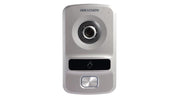
Hikvision DS-KV8102-IP: A Practical Guide to Choosing a Villa Door Station
, by Rukxi Team, 6 min reading time
, by Rukxi Team, 6 min reading time
A practical look at the Hikvision DS-KV8102-IP villa door station: 1.3 MP camera, 720p video, IR night vision, Ethernet, alarm interfaces, and IP65 protection — plus what to check before buying.
When choosing a door communication system, the outdoor station plays an important role. It needs to provide clear video, reliable connectivity, and protection against outdoor conditions while working smoothly with the indoor station.
Specifications as listed by IT Gallery. Prices and availability can change, so check the product page before ordering.
The basics
It is a villa door station designed with entrance communication requirements in mind. Available through IT Gallery, it combines a 1.3 MP HD camera, 720p video, IR night vision, Ethernet connectivity, alarm interfaces, and IP65 protection in one compact unit.
The unit uses a plastic housing, supports 12 VDC power, and is intended to work with an indoor station as part of a door communication setup. IT Gallery lists support for one indoor station, making it suitable for applications where communication between the entrance and an indoor location is required.
Key features
Provides video monitoring at the entrance with HD 720P resolution at 25fps. This gives the door station a dedicated video component for viewing the area around the entrance.
Includes IR supplementation for night vision, helping the camera operate when there is limited visible light. Combined with its 720p resolution, it provides a straightforward video solution for day and night.
Supports 10/100 Mbps self-adaptive Ethernet. This allows the door station to use a wired network connection, offering installation flexibility depending on your cabling and intercom setup.
Beyond video and networking, it includes an RS-485 interface, four alarm inputs, and one alarm output. These provide additional connection possibilities for a broader compatible security setup.
Since a villa door station is normally positioned at an entrance, protection against dust and water exposure is critical. The DS-KV8102-IP is listed with an IP65 protection rating for outdoor-facing installations.
Spec sheet
| Feature | Listed specification |
|---|---|
| Camera | 1.3 MP HD |
| Video resolution | HD 720p at 25fps |
| Night vision | IR supplementation |
| Network | 10/100 Mbps self-adaptive Ethernet |
| Alarm interfaces | 4 inputs, 1 output |
| RS-485 interface | Yes |
| Protection rating | IP65 |
| Indoor station support | 1 |
| Power | 12 VDC |
| Housing | Plastic |
Is it for you?
A villa door station can be useful wherever communication and video monitoring are needed at a property's entrance. Homeowners may consider it in various scenarios:
Building a new villa security setup from scratch.
Upgrading an existing door communication system.
Adding a dedicated video component to an entrance.
Planning a network-based door communication installation.
The right choice will depend on the property's layout, existing equipment, cabling, and the features required from the complete system.
Before you buy
Choosing a door station should involve more than simply looking at the camera resolution. Consider how the device will fit into the complete installation.
Availability
Pricing and availability can change. Check the IT Gallery product page for the latest information before ordering.
The DS-KV8102-IP is listed by IT Gallery as a Villa Door Station, making it a model to consider for compatible villa door communication installations.
Yes. It has a 1.3 MP HD camera with HD 720p resolution at 25fps.
Yes. IT Gallery lists IR supplementation for night vision.
The device supports 10M/100M self-adaptive Ethernet.
Yes. The product is listed with an IP65 protection rating.
A good villa door station should balance video quality, connectivity, outdoor protection, and compatibility with the rest of the installation. The Hikvision DS-KV8102-IP offers these core features through its 1.3 MP HD camera, 720p video, IR night vision, Ethernet connection, alarm interfaces, RS-485 interface, and IP65 protection.
Review these specifications alongside your property's requirements, then check the latest price and availability on the IT Gallery product page.


Subscribe to our emails