
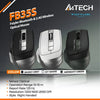
Is the A4Tech FB35S the Ultimate Budget Silent Mouse?
, by Admin Account, 4 min reading time
, by Admin Account, 4 min reading time
Finding an affordable computer mouse that delivers performance, quiet clicks, and multi-device connectivity without breaking the bank can feel impossible. Enter the A4Tech FB35S F styler Bluetooth Dual-Mode Mouse a compact workspace companion designed for productivity power users, students, and remote workers alike.
In this review, we break down why the A4Tech FB35S is taking remote setups by storm and whether it deserves a spot on your desk.
| Feature | Details |
|---|---|
| Connectivity | Bluetooth (4.0/3.0) + 2.4GHz Wireless (USB Receiver) |
| Multi-Device Support | Pairs up to 3 devices simultaneously |
| Sensor & DPI | Optical; 1200 / 1600 / 2000 Adjustable DPI |
| Buttons | 6 Buttons (Includes 2 Side Navigation Buttons) |
| Click Type | Whisper-Quiet Clicks (Silent Switches) |
| Ergonomics | Right-handed contoured grip |
| Battery Life | Up to 12 months (1× AA Alkaline Battery) |
| OS Support | Windows, macOS, Chrome OS, Android |
If you alternate between a work desktop, a personal laptop, and a tablet, switching peripherals is a hassle. The A4Tech FB35S solves this by allowing you to pair one device via the 2.4GHz USB dongle and two devices via Bluetooth. A single click of the toggle switch lets you jump between screens effortlessly.
The "S" in FB35S stands for Silent. A4Tech engineered this switch mechanism to reduce clicking noise by over 90% compared to standard mice. Whether you work late at home, study in a quiet library, or share a hot-desking office, your clicks won't disturb anyone.

Sensitivity matters whether you're editing spreadsheets or navigating high-resolution monitors. The built-in DPI toggle allows instant switching across three levels:
Unlike flat ambidextrous travel mice, the Fstyler FB35S features a sculpted right-handed design with a comfortable thumb rest. It includes two conveniently placed side buttons for effortless forward/backward browser navigation.
If you want a reliable, quiet, and ergonomic multi-device mouse that fits seamlessly into your work routine, the A4Tech FB35S Fstyler is hard to beat. It packs high-end features like Bluetooth triple-pairing and adjustable DPI into a budget-friendly package.


Subscribe to our emails