
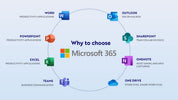
Many businesses associate Microsoft 365 with Outlook email, but the platform offers far more than email communication. As organizations embrace hybrid work, cloud collaboration, and digital transformation, Microsoft 365 has evolved into a complete productivity solution that helps employees communicate, collaborate, and work securely from virtually anywhere. By combining multiple business applications into a single cloud-based platform, Microsoft 365 enables organizations to improve efficiency while supporting long-term business growth.
What Is Microsoft 365?
Microsoft 365 is a cloud-based productivity platform that combines familiar Microsoft applications with collaboration, communication, cloud storage, and security services. In addition to Outlook, it includes tools such as Microsoft Teams, OneDrive, SharePoint, Word, Excel, PowerPoint, and other business applications that work together to improve workplace productivity.
Because these services are cloud-based, employees can securely access files, communicate with colleagues, and continue working from the office, home, or while traveling.
Improving Collaboration Across Teams
Modern businesses rely on teamwork, and Microsoft 365 makes collaboration easier than ever. Employees can work together on the same documents in real time, share files securely, schedule meetings, and communicate through Microsoft Teams.
Secure Access to Business Information
Business data is one of an organization's most valuable assets. Microsoft 365 provides secure cloud storage through OneDrive and SharePoint, allowing employees to access documents whenever they need them while maintaining appropriate security controls.
Built-in security features such as multi-factor authentication, data encryption, and identity management help protect business information from unauthorized access while supporting secure remote work.
Supporting Hybrid and Remote Work
Flexible working has become a normal part of business operations. Microsoft 365 enables employees to remain productive whether they are working from the office, home, or another location.
Cloud-based applications allow users to continue working across multiple devices while automatically synchronizing documents and updates. This flexibility helps businesses maintain productivity without sacrificing collaboration or security.
Simplifying IT Management
Managing separate software licenses and communication tools can become increasingly complex as businesses grow. Microsoft 365 simplifies administration by bringing productivity applications, cloud services, and user management into a single platform.
Automatic updates ensure employees always have access to the latest features and security improvements, reducing the administrative workload for internal IT teams while improving overall system reliability.
How IT Gallery Helps Businesses Get the Most from Microsoft 365
Successfully implementing Microsoft 365 requires more than creating user accounts. IT Gallery helps businesses plan, deploy, configure, and support Microsoft 365 environments that align with operational requirements. From user migration and licensing to security configuration and ongoing technical support, IT Gallery helps organizations maximize the value of their Microsoft 365 investment while maintaining a secure and productive workplace.
Final Thoughts
Microsoft 365 is much more than an email platform. It provides businesses with the tools needed to improve collaboration, strengthen security, simplify IT management, and support modern ways of working. By making full use of its cloud-based capabilities, organizations can build a more connected, productive, and future-ready workplace. With expert implementation and ongoing support from IT Gallery, businesses can confidently unlock the full potential of Microsoft 365 while ensuring their technology continues to support long-term success.
Frequently Asked Questions
Can employees work remotely with Microsoft 365?
Yes. Microsoft 365 allows employees to securely access files, collaborate with colleagues, and use business applications from almost anywhere with an internet connection.
Is Microsoft 365 secure for businesses?
Yes. Microsoft 365 includes advanced security features such as multi-factor authentication, encryption, identity management, and regular security updates to help protect business information.
Why should businesses use professional Microsoft 365 deployment services?
Professional deployment helps ensure proper licensing, secure configuration, successful data migration, and smooth integration with existing business systems while minimizing disruption.


